What it solves

Common Accounting Firm Problems ZiePieBooks Solves

The question and the answer up top, the screen it happens on right below. Filter by what matters to your firm.

Firm management and visibility

01

Where does the firm actually stand this week?

Firm owner

One live dashboard shows every client, engagement, and period, whether it's active, overdue, ready to close, or paused, current to the second. The whole practice on one screen.
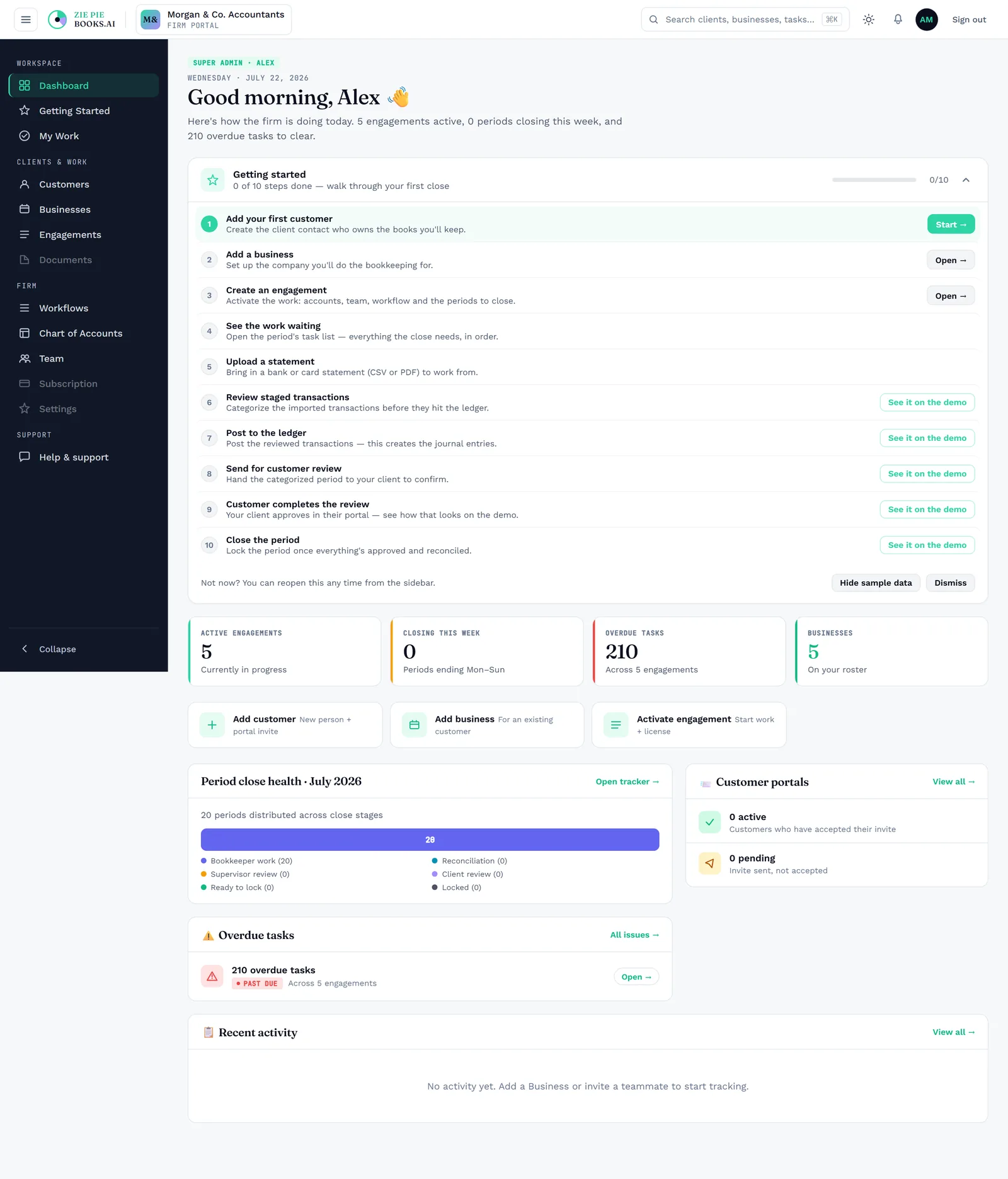
app.ziepiebooks.ai/firm/dashboard
Firm dashboard showing every client, engagement, and period status on one live screen.
Firm dashboard · the whole practice, live
02

Why does my firm's work live in logins I don't own?

Firm owner

Your clients' books move under your firm's roof into one system you control. You keep them as long as you choose, export them whenever you want, and they stay fully isolated from every other firm.

app.ziepiebooks.ai/firm/businesses
Businesses roster: every client's books living under the firm's own account.
Businesses roster · under your firm's roof
03

What happens when my most senior person is on leave?

Firm owner

Reusable workflow templates capture your firm's standard stages and tasks once. Every engagement runs on a template, and tasks generate themselves per period, per account, or per event.

app.ziepiebooks.ai/firm/workflows
Reusable workflow templates capturing the firm's standard stages and tasks.
Workflow templates · your process, captured once
04

Who was supposed to pick this up after review?

Practice manager

Tasks route in order: bookkeeping, review, sign-off, then client sign-off. The next period unlocks only when the last is done. Everyone gets a personal queue, and managers get the firm-wide view. You're not the one chasing it, either: notifications fire at the right moments, when a client needs to review or when work is ready, and new monthly periods open on schedule, so the work appears without anyone remembering to create it.

app.ziepiebooks.ai/firm/my-work
Period-close flow: stages move bookkeeping to review to sign-off, and the next period unlocks in order.
Period close · routed, never dropped

Client onboarding and engagements

05

Why does onboarding one client take a week of email?

Practice manager

Send one link. The client verifies by email, shares which banks they use, uploads what's needed, and acknowledges the engagement, all in one place and all recorded. Nothing handled offline, nothing lost.

app.ziepiebooks.ai/firm/onboarding
Engagement wizard: intake, accounts and team, workflow, tasks, license, and review — one guided flow.
Onboarding wizard · one link, all recorded
06

How big is this catch-up job, really?

Practice manager

When you activate an engagement, the system generates every month and every task across it at once, so you see the entire workload on day one and can resource it.

app.ziepiebooks.ai/firm/engagements
Engagement view showing every period and task across a full catch-up job, generated at once.
Engagement periods · the whole job, day one
07

Where did we agree on that scope change?

In development Firm owner

Capture scope and pricing in a structured proposal, with line items, cadence, quantities, discounts, and deposit, that becomes a live engagement on acceptance. Negotiation happens as recorded notes, not a mail thread. When scope changes, amendments are proposed, signed, and applied with a clear before-and-after trail.

app.ziepiebooks.ai/firm/proposals
Proposals flow: the proposal list, then a proposal detail with scope, pricing, and signature status.
Proposals · in development

Bookkeeping and transaction categorization

08

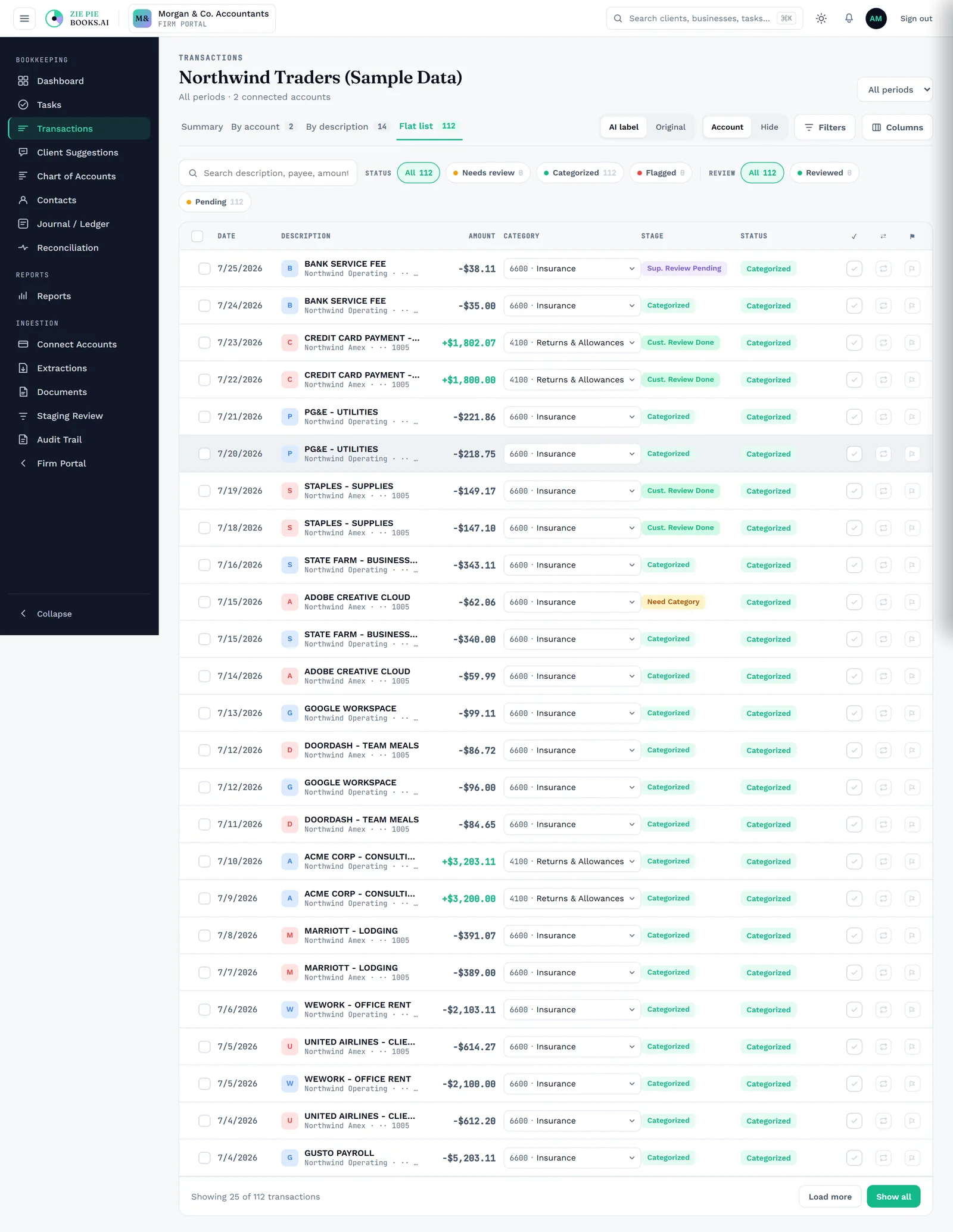
Why am I still categorizing the same lines every month?

Senior bookkeeper

The system checks your firm's own approved history first, matching descriptions you've already categorized straight to their account, and only calls on AI for the ones you've genuinely never seen, each with a confidence score. When nothing on the chart fits, it proposes a new account rather than forcing a bad match.

app.ziepiebooks.ai/bookkeeper/transactions
Transactions categorized from firm history first, with AI confidence scores on the unknowns.
AI categorization · history first, AI for the rest
09

Why does a year of statements take days to get in?

Bookkeeper

Connect a bank and transactions flow in automatically. Upload a PDF or CSV, even a full year in one file, and the platform reads it and drops the transactions straight into review, with duplicate statements caught on the way in.

app.ziepiebooks.ai/bookkeeper/staging
Statement ingestion flow: CSV upload with duplicate detection, then PDF extract with confidence-scored rows, then every source landing in one staging review queue.
Statement ingest · CSV → PDF → one review queue

Review, reconciliation and reporting

10

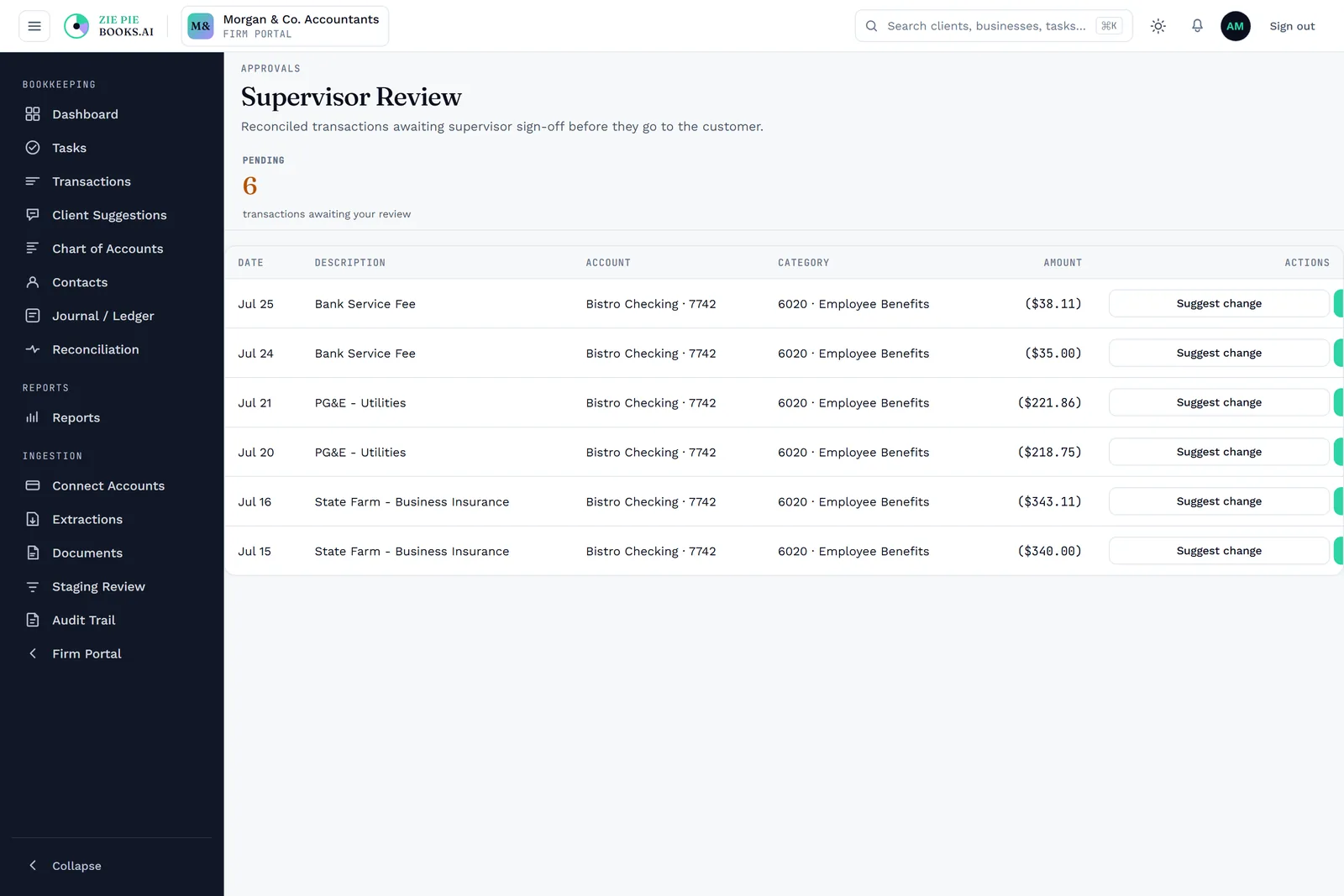
Did anyone actually review this before it closed?

Reviewing accountant

Every transaction moves through a recorded approval chain: bookkeeper, reconciliation, supervisor, client, then accountant. Each step is its own permanent history entry. Clients review and approve their own actual transactions in a secure portal and sign off on closed periods, and nothing closes without passing through.

app.ziepiebooks.ai/firm/review
Supervisor review view showing the recorded approval chain each transaction passes through.
Review chain · nothing closes unseen
11

Why is month-end always a scramble?

Bookkeeper

A reconciliation workspace matches against the statement and validates the cleared balance, then routes everything into approval. Outstanding items carry forward correctly. Sign off, lock the period, and it's immutable.

app.ziepiebooks.ai/bookkeeper/reconciliation
Reconciliation flow: overview, periods, statement, enter statement, then auto-reconciled compare.
Reconciliation · match, validate, lock

Security, audit and access

12

Can I prove who approved this, two years later?

Firm owner

Changes are written to a cryptographically chained log and re-checked every night. Journal entries carry their own approval lifecycle and per-entry history, and every account has a full ledger with a running balance. If someone altered a closed record, the chain wouldn't line up and you'd catch it.

app.ziepiebooks.ai/firm/audit-trail
Audit trail: a cryptographically chained log of changes, re-verified nightly.
Audit trail · hash-chained, verified nightly
13

How do I give the right access without exposing everything?

Practice manager

Granular, role-based permissions for bookkeepers, supervisors, accountants, and more, enforced at every action rather than just by hiding a button. Each firm's data is isolated at the database level, so a query that tried to read another firm's rows would return nothing. The same standardization applies to the books themselves: hold your chart of accounts as a firm template and reuse it across engagements, so every client is structured the same way instead of drifting client by client.

app.ziepiebooks.ai/firm/team
Team page with granular, role-based permissions enforced at every action.
Roles & access · enforced, not just hidden

Migration

14

Isn't leaving QuickBooks or Xero basically starting over?

Firm owner

Connect your QuickBooks or Xero account, preview exactly what's coming over, then import category by category or all at once, with clean opening balances carried forward. Coming over is gradual and reversible, not a cliff.

app.ziepiebooks.ai/firm/migration
Migration from QuickBooks or Xero, carrying forward clean opening balances.
Migration · gradual, not a cliff
No questions in this theme.

See it solve these for your firm

Free to start. Create your account, load the demo data, and see every answer on your own screen.

An unhandled error has occurred. Reload 🗙

Rejoining the server...

Rejoin failed... trying again in seconds.

Failed to rejoin.
Please retry or reload the page.

The session has been paused by the server.

Failed to resume the session.
Please retry or reload the page.