Ask most accounting firm owners where the practice stands this week and you will get a pause, then a plan: check the tracker spreadsheet, message the senior bookkeeper, scroll back through Slack, and open a couple of client files to be sure. By the time the answer is assembled, it is already out of date.
That Monday status ritual feels like management. It is actually a symptom. The firm's real state lives in too many places, so someone has to rebuild it by hand. This post looks at why that happens, what it costs, and how ZiePieBooks replaces the ritual with one live screen.
Key Takeaways:
- Status meetings and tracker spreadsheets exist because the work and the record of the work live in different tools.
- A tracker is only as current as the last person who touched it, which means it is usually wrong.
- A firm dashboard is only useful if it reads the same records the team works in, not a copy of them.
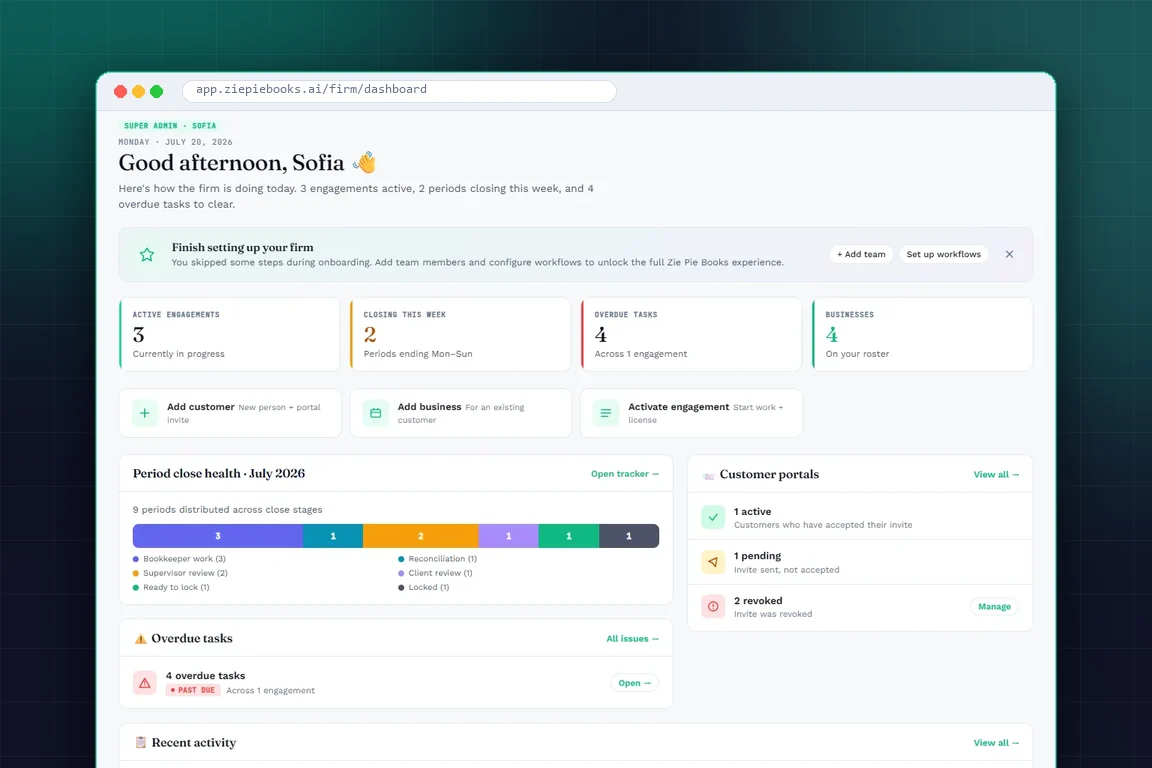
- ZiePieBooks puts active engagements, closing periods, overdue tasks, close-stage health and client portal status on one screen.
- Each person gets their own queue in My Work, so the dashboard answers "what is the firm doing" and My Work answers "what should I do next."
Why Firm Status Is So Hard to See
A typical small or mid-sized practice runs on three or four separate systems. There is a bookkeeping app per client, a practice management or task tool, a shared spreadsheet for deadlines, and email or chat for everything that does not fit anywhere else.
None of those tools knows what the others know. The bookkeeping app knows a bank feed came in, but not that the review is overdue. The task tool knows a task exists, but not whether the reconciliation behind it balanced. The spreadsheet knows whatever someone typed into it last Thursday.
So the owner, or a practice manager, becomes the integration layer. They ask, collect and reconcile status across tools. Every hour spent doing that is an hour not spent on reviews, client conversations or growing the firm.
The hidden cost of "just checking in"
The obvious cost is the owner's time. The less obvious cost is interruption. Every "where are we on Blue Harbor?" message pulls a bookkeeper out of focused work. Multiply that across a team and a week, and the firm is paying a real tax just to know what it is doing.
The worst cost is what the ritual misses. A period that quietly stalls in review, or a client who never accepted their portal invite, does not show up in anyone's status update. It shows up two weeks later as a missed deadline.
What a Firm Dashboard Needs to Answer
A useful firm dashboard is not a chart wall. It answers a short list of questions an owner actually asks on a Monday morning:
- How much work is live? Active engagements and the businesses on the roster.
- What is due soon? Periods closing this week.
- What is late? Overdue tasks, and which engagements they belong to.
- Where is everything in the close? How many periods are in bookkeeping, review, reconciliation, client review, ready to lock, or locked.
- Are clients engaged? Which portal invites are accepted, pending or revoked.
- What just happened? A feed of recent team and client activity.
Just as important is where those answers come from. If the dashboard reads a separate tracker, you have only moved the spreadsheet problem. The dashboard has to read the same records the team is working in.
How ZiePieBooks Solves It: One Live Screen for the Whole Practice
In ZiePieBooks, firm management and bookkeeping are one system. The engagement, the period, the task, the bank transaction and the review step are all records in the same place. The firm dashboard simply reads them.
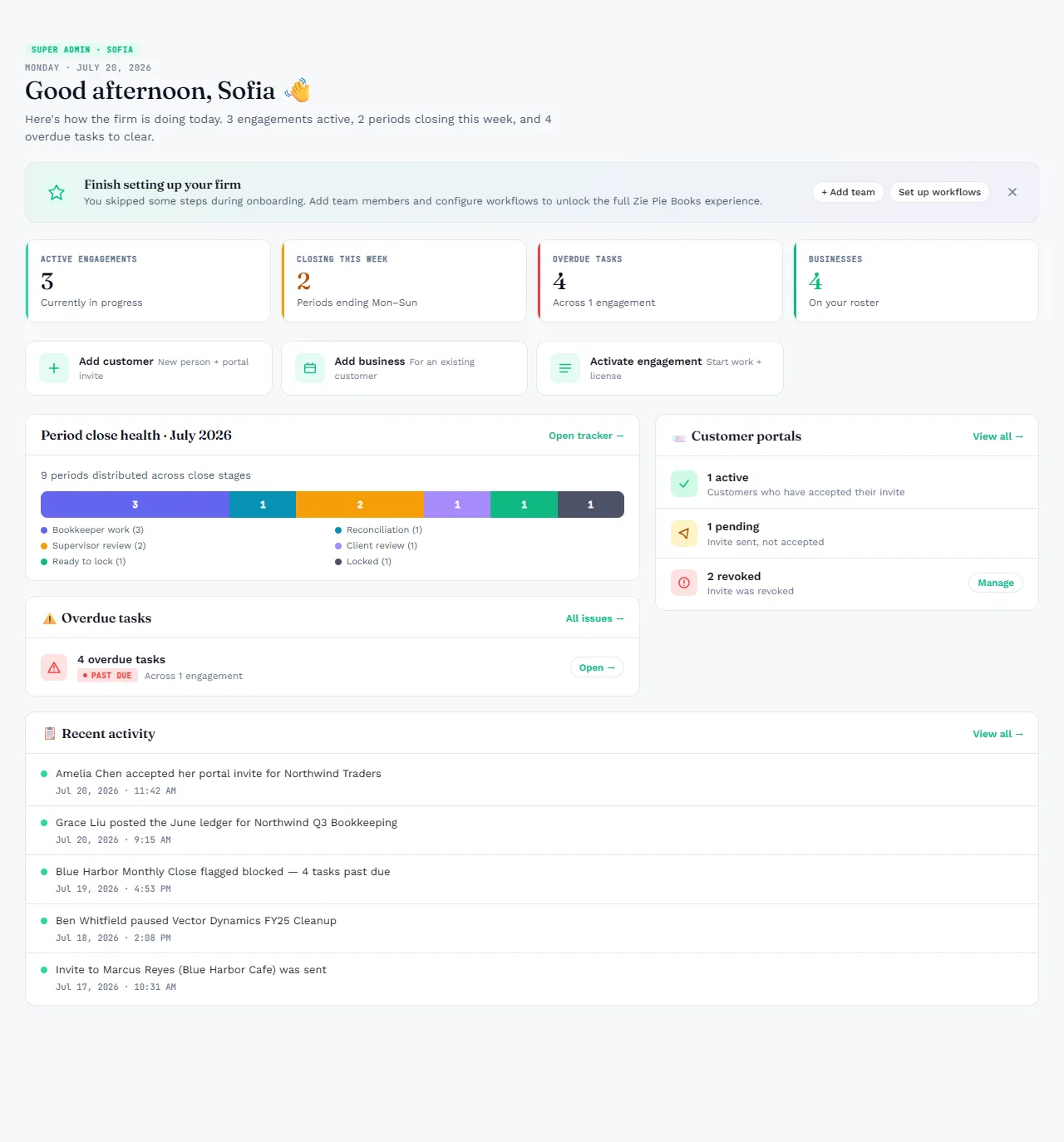
Here is what each part of that screen replaces:
- The four counters replace the "how busy are we" question. Active engagements, periods closing this week, overdue tasks and businesses on the roster are visible at a glance.
- Period close health replaces the tracker spreadsheet. Every open period sits on one strip by stage: bookkeeper work, reconciliation, supervisor review, client review, ready to lock, and locked. A pile-up in one stage is obvious.
- Overdue tasks replaces the late-deadline surprise. It names how many tasks are past due and across how many engagements, with a link straight to them.
- Customer portals replaces chasing clients by email. You can see who accepted their invite, who has not, and whose access was revoked.
- Recent activity replaces "did anyone do anything on this?" It shows who posted a ledger, who flagged an engagement as blocked, and which client just joined.
From the firm view to each person's queue
A dashboard tells the owner where the firm stands. It does not tell a bookkeeper what to do next. That is the job of My Work.
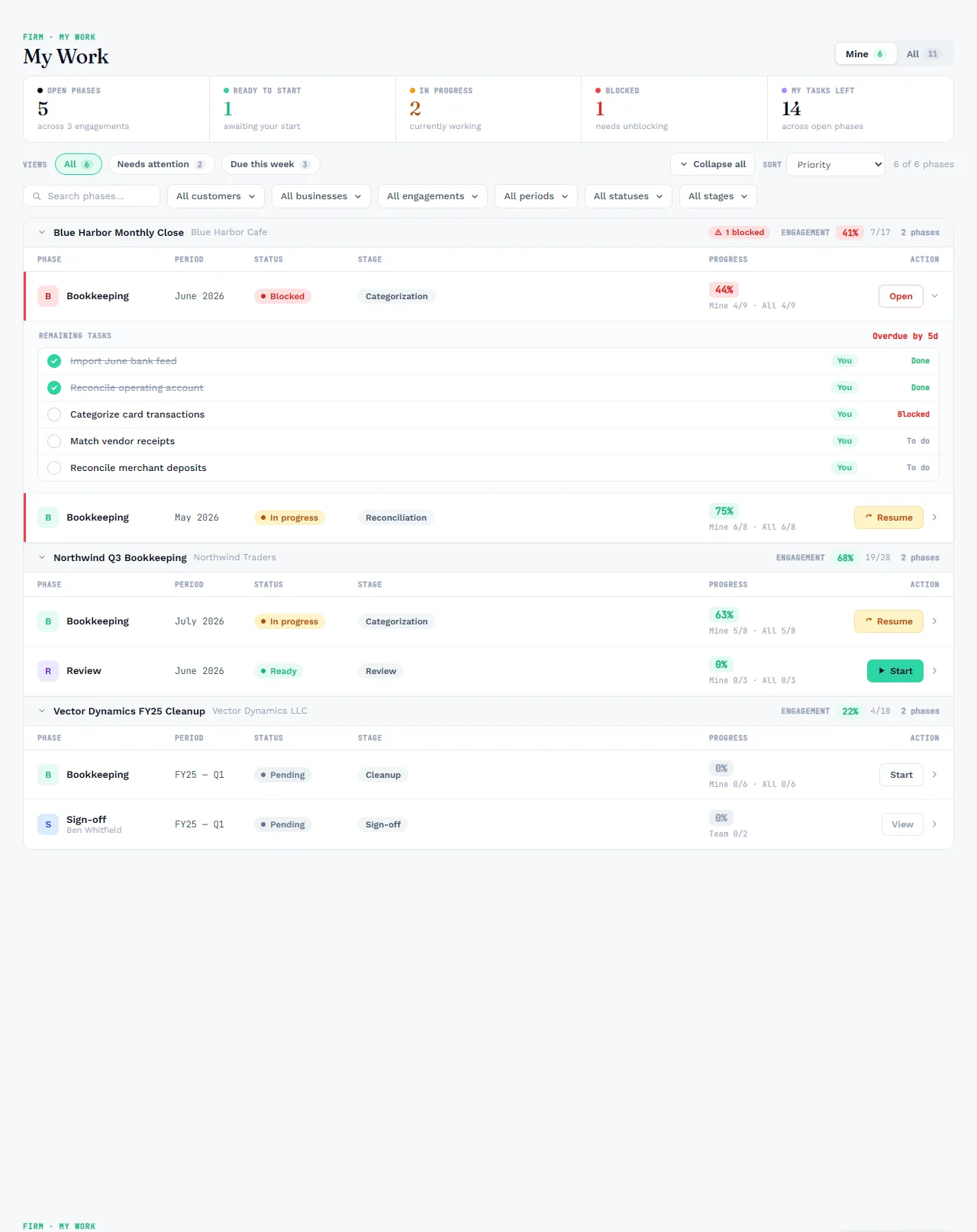
In the screenshot above, the June bookkeeping phase for Blue Harbor Cafe is blocked and overdue by five days. It sits at the top of the list with its remaining tasks expanded. Nobody had to report that in a meeting. The blocked task is the report.
Managers can switch from their own queue to the whole team's, which shows where work is stuck and who has capacity. That is the conversation a status meeting was trying to have, without the meeting.
How to Retire Your Monday Status Ritual
Switching tools does not fix the habit on its own. A simple rollout looks like this:
- Move the work, not just the tracker. Run engagements, periods and tasks in the same system as the books. A dashboard over a copy of the work will drift.
- Start every engagement from a workflow template. When every client runs on defined stages, the close-stage strip means the same thing for every client.
- Replace the meeting with the screen. For two weeks, open the dashboard instead of asking for updates. Only ask about what the screen flags.
- Use blocked status honestly. A blocked task with a reason is worth more than a cheerful "almost done." Encourage the team to mark it.
- Review client portal status weekly. Pending invites are an early warning that a client will be slow to review and sign off.
See your own firm on one screen
Try ZiePieBooks free for 30 days, with the entire platform included. Add a client, activate an engagement, and the dashboard fills itself in. Create your free account or see the other problems ZiePieBooks solves.
Frequently Asked Questions
What should an accounting firm dashboard show?
+
At minimum: active engagements, periods closing this week, overdue tasks, where every open period sits in the close process, which clients have accepted their portal invite, and what the team did most recently. Anything less and someone still has to go and ask.
Why are spreadsheets a poor way to track firm status?
+
A spreadsheet is a copy of the work, not the work. It is only as current as the last person who updated it, so it drifts from reality within hours and someone has to spend time keeping it in sync.
How does ZiePieBooks keep its dashboard current?
+
The dashboard reads the same records your team works in. When a bookkeeper finishes a task, a reviewer approves a period, or a client accepts an invite, the dashboard reflects it because there is no separate tracker to update.