If you've ever spent a Sunday night sorting through receipts or realized your bank balance and your books don't match three days before tax season, you already know the problem. Manual bookkeeping is a time sink, and for most small business owners, it's not even something they enjoy. It just has to get done.
AI bookkeeping won't fix everything overnight. But when it's set up right, it genuinely takes a load off. This guide walks through what these tools actually do, which ones are worth your time, how to get started without making a mess of your existing records, and where you still need a real person involved.
Key Takeaways:
- AI bookkeeping handles the repetitive, time-consuming work data entry, transaction matching, and invoice capture so you're not doing it by hand.
- The cost difference between AI tools and a full-time bookkeeper is significant. Most platforms run $30–$200 per month. A bookkeeper costs $40,000–$55,000 a year.
- QuickBooks, Xero, Botkeeper, and ZiePieBooks each serve different needs. Picking the wrong one for your situation creates more friction than it solves.
- Data migration is where most implementations go sideways. Take it seriously.
- AI handles volume well. It doesn't handle judgment well. You still need a qualified accountant reviewing the output.
How Bookkeeping Got Here
Not that long ago, bookkeeping meant a physical ledger and a lot of patience. Then spreadsheets came along. Then desktop accounting software. Each step made things a little easier, but the core problem never really went away someone still had to touch every single transaction.
Cloud accounting helped. You could connect your bank feed, work with a remote bookkeeper, and pull up reports from anywhere. That was a real improvement. But you were still relying on people to categorize transactions, track down missing documents, and close the books each month.
AI takes it a step further. It reads your bank transactions, sorts them into the right categories based on patterns it's picked up over time, flags anything that looks off, and keeps your books current—without someone sitting there entering data manually. For a small business owner who's already juggling a dozen things at once, that's not a small thing.
According to Sage research, 66% of accountants said they would invest in AI to automate repetitive and time-consuming tasks. Honestly, it's already happening. Businesses that have made the switch are seeing it in their day-to-day operations, not just reading about it in reports.
What AI Bookkeeping Actually Does Well
"AI bookkeeping" gets thrown around a lot, and not every tool does the same things. Here's what the better platforms actually handle:
Transaction categorization: The tool connects to your bank and card accounts, pulls in every transaction, and assigns it to the right category based on patterns it's learned from your history. The longer it runs, the better it gets. If you've always tagged a certain vendor as a marketing expense, it remembers that.
Receipt and invoice capture: Most platforms use OCR to read photos or uploaded PDFs and pull out the key details vendor, amount, date, tax. No retyping anything. This is a big deal if you deal with a lot of supplier invoices or employee expenses.
Anomaly detection: The system keeps an eye on your spending and flags things that look wrong duplicate payments, unusual charges, transactions that don't fit the normal pattern. It's not perfect, but it catches things that are easy to miss when you're scanning through hundreds of transactions on your own.
Real-time reporting: You don't have to wait until the end of the month to know where you stand. Cash flow, margins, outstanding invoices it updates continuously.
Where AI falls short is anywhere that requires actual judgment. Complex transactions, unusual vendor arrangements, and tax situations that are specific to your industry still need a real person who understands accounting, not just pattern recognition.
Comparing the Main Platforms
The tools have come a long way. Here's a practical look at what's out there:
| Platform | Best For | Starting Price | Key AI Features |
|---|---|---|---|
| QuickBooks | All-around small business use | $38/month | Auto-categorization, receipt capture, cash flow forecasting |
| Xero | Growing businesses and accountants | $25/month | Smart reconciliation, automated invoicing, real-time reporting |
| Botkeeper | Accounting firms and larger SMBs | Custom pricing | Full-cycle automated bookkeeping, ML-powered reconciliation |
| FreshBooks | Freelancers and service businesses | $23/month | Automated invoicing, expense tracking, time billing |
| Zoho Books | Budget-conscious small businesses | Free (up to $50K revenue) | Workflow automation, bank feeds, AI receipt scanning |
| ZiePieBooks | Accounting firms managing multiple clients | Free to start | AI-assisted categorization with confidence scores, firm-controlled workflows, QuickBooks/Xero migration, firm-wide dashboard |
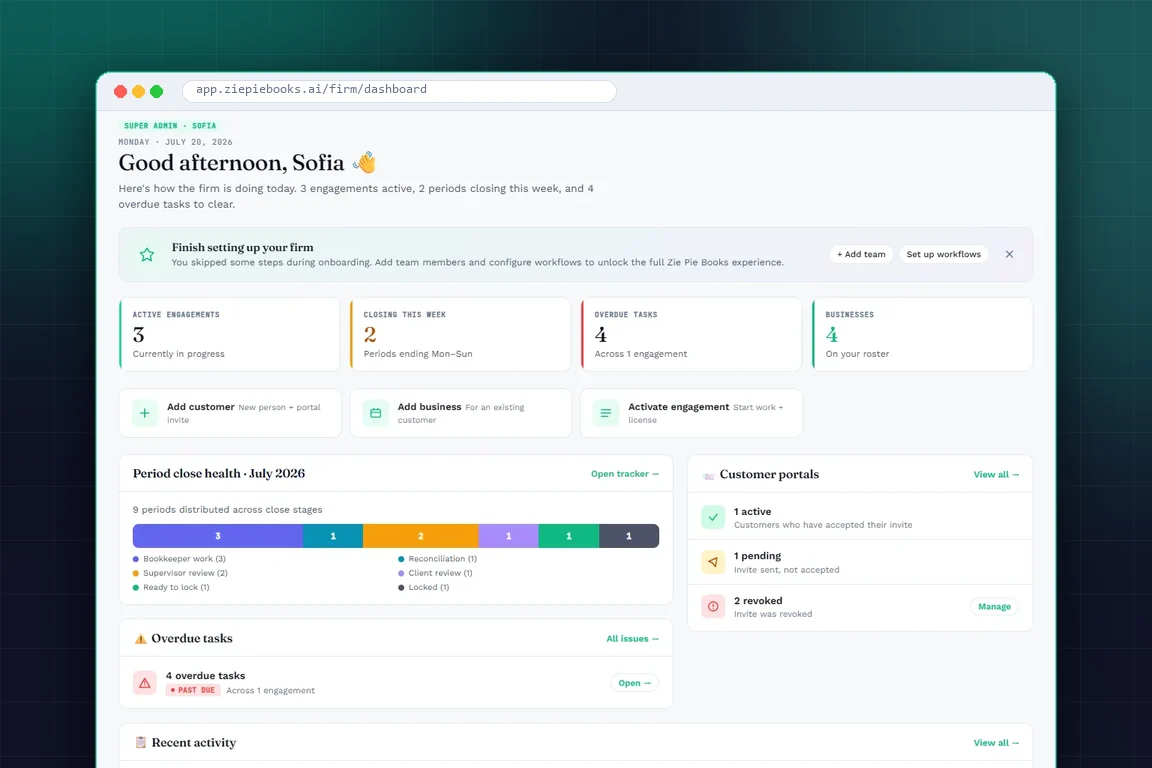
ZiePieBooks is worth a look if you run an accounting firm with multiple client accounts. The problem it's built to solve comes up constantly: a firm's work spread across dozens of client-owned logins, no consistent process, and no way to see where everything stands at a glance. ZiePieBooks pulls all client books under the firm's control, runs every engagement through one standardized workflow intake, categorization, review, reconciliation, period close, and client sign-off and gives you a live dashboard showing every client's status in real time.
Here's the part that matters if you're wary of handing your books to an algorithm:
ZiePieBooks uses AI, but the AI never operates on its own. It works under human control at every point. The system checks your firm's own approved vendor history first and matches known transactions instantly. For anything it hasn't seen before, it makes an AI-assisted suggestion attached to a confidence score a number that shows how sure the AI is about its own guess. That suggestion is not the final answer.
It's a proposal a reviewer either confirms or corrects. No AI categorization gets finalized until a human on your team signs off on it. Every transaction moves through the firm's recorded approval chain before a period can close, which means the AI does the sorting and the person makes the decision. The AI carries the volume; your team keeps the judgment and the final say. There's also a guided migration path from QuickBooks or Xero with clean opening balances.
For solo operators or small teams, one of the other platforms will likely be a better fit. But for firms managing a meaningful number of clients, ZiePieBooks directly addresses the login-sprawl headache while keeping a human in charge of every entry.
How to Roll Out AI Bookkeeping Without Creating a Mess?
This is where a lot of small businesses trip up, not because the tools are complicated, but because the setup gets rushed.
Step 1: Understand your current situation first
Before you pick anything, take stock of what you're working with. How many transactions does your business process each month? Do you have a bookkeeper or accountant already? What software are you using now? The answers shape which platform makes sense and how involved the migration will be.
Step 2: Match the tool to your actual needs
Don't pick based on brand recognition alone. Run the free trial and watch how the AI handles your specific transactions. If it keeps miscategorizing your main vendors during the trial period, that's not going to improve once you're fully committed.
Step 3: Take data migration seriously
This step gets underestimated more than any other. Exporting historical records, cleaning up the data, and getting your opening balances right- if done poorly, it can create months of reconciliation headaches. Most platforms offer migration support. Use it, or loop in your accountant for this part.
Step 4: Train whoever touches the books
The AI does most of the heavy lifting, but someone still needs to review categorizations, fix errors, and understand what the dashboards are showing. Set aside time for proper onboarding. Most platforms have good tutorial libraries and live support; take advantage of them early, not after something goes wrong.
Step 5: Set benchmarks and actually check them
Before you go live, write down where things stand: hours per week on bookkeeping, monthly accounting costs, how long it takes to close the books. Come back at three months and six months. If the numbers haven't moved in the right direction, something in the setup needs a second look.
Challenges Worth Knowing About Before You Start
Every tool has tradeoffs. These are the ones that come up most often:
Data security: Your financial data is flowing through third-party servers. Before signing up, read their security page, understand how data is encrypted and isolated, and look at their data residency policy, especially if you're in a regulated industry.
The learning curve is real: If you haven't used accounting software before, plan for a few weeks of adjustment. Pick a platform with responsive support and don't expect to be fully comfortable on day one.
Tax compliance still needs a human: AI categorizes based on general patterns. Tax rules vary by industry, business type, and location. Always have a qualified accountant look over the output before you file anything.
Don't over-trust the automation: The AI will occasionally get something wrong, especially with new vendors or unusual transactions. Month-end review isn't optional; it's where you catch the mistakes before they become bigger problems.
The approach that tends to work best: let the AI handle the volume and routine work, and have a professional handle the review and anything that needs real judgment. One without the other creates gaps.
Frequently Asked Questions
What is AI bookkeeping for small business?
+
AI bookkeeping uses artificial intelligence to handle the repetitive side of accounting data entry, transaction categorization, invoice processing, and reporting automatically and in real time. The idea is that you spend less time on the books and more time running your business.
Is AI bookkeeping safe for sensitive financial data?
+
Reputable platforms encrypt data in transit and at rest, isolate each customer's data from every other customer's, and are open about how they work. Before you connect your accounts, check what they publish about their security practices, where your data is stored, and what access controls are in place.
Can AI bookkeeping replace a human accountant?
+
For the routine, repetitive stuff, yes, it handles most of that. But it can't replace the judgment a qualified accountant brings. Tax strategy, compliance review, and financial planning—anything that requires interpretation rather than pattern matching—still needs a professional.
How much does AI bookkeeping software cost for small businesses?
+
Most platforms run $15 to $200 per month depending on features and volume. Some, like Zoho Books, have free tiers for very small businesses. Stack that up against the cost of a full-time bookkeeper ($40,000–$55,000 a year) and the math is pretty easy.
How long does it take to set up AI bookkeeping?
+
It depends on how complex your migration is. A straightforward setup with clean data can be done in a day. Something more involved—historical records and multiple integrations—can take one to two weeks. Most platforms offer guided onboarding support. Use it rather than trying to figure it all out yourself.
Final Thoughts
AI bookkeeping is no longer an experiment. The decision most businesses face now is not whether to adopt it, but which platform fits their actual situation. A solo operator with steady, manageable volume needs a different solution than an accounting firm running thirty client engagements simultaneously. Getting that match wrong creates more administrative work, not less.
Whatever platform you choose, the principle is the same: automate the volume, but keep a qualified professional in the review loop. AI categorizes based on patterns — it does not interpret tax rules, catch judgment-sensitive errors, or take responsibility for what gets filed. That gap is where human review earns its place.
ZiePieBooks is built around this directly: every AI suggestion carries a confidence score, and no categorization is finalized until a human on your team approves it. The AI does the sorting; your team makes the call.