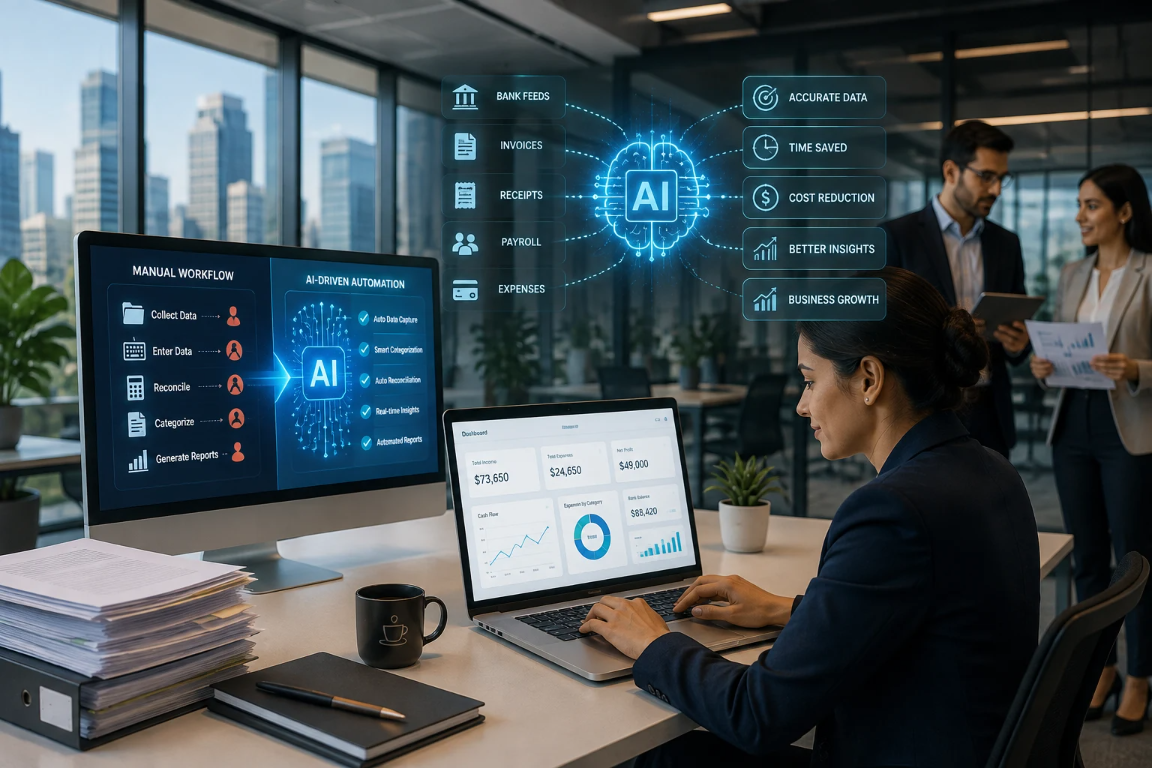
AI-driven bookkeeping uses smart technology to handle boring, repetitive tasks like entering data, sorting transactions, matching bank records, and processing invoices. The result is faster work, fewer mistakes, and more time for accountants to help clients instead of typing numbers all day.
Traditional bookkeeping is slow. Every transaction gets typed in by hand. Every bank statement gets downloaded, read, and checked line by line. Every invoice needs someone to find the date, amount, and vendor name before anything gets recorded. For small businesses and accounting firms, these tasks eat up hours that could be spent on more important work.
AI-driven bookkeeping changes all of that. Instead of automating just one task, modern AI bookkeeping platforms connect the whole workflow from start to finish. This post explains how that works, what tasks AI handles best, and what humans still need to do.
What Is AI-Driven Bookkeeping?
AI-driven bookkeeping uses machine learning, optical character recognition (OCR), and smart automation to handle the steps in a normal bookkeeping workflow. The big difference from regular accounting software is not just speed. It is adaptability.
Basic accounting software follows set rules. AI-powered bookkeeping learns. It spots vendor patterns, adjusts to how a business likes to sort expenses, and gets better the more transactions it handles. When an accountant fixes a wrong category, that fix teaches the system so it does better next time.
This matters because bookkeeping workflows change. Vendors change names. Expense categories shift. Business rules update. Rule-based automation breaks when rules change. AI-driven systems keep up.
How AI Learns From Financial Data
AI bookkeeping platforms get smarter by looking at several types of data:
- Transaction patterns — charges that repeat, seasonal expenses, and how often payments happen
- Vendor and merchant information — matching known suppliers to new transactions right away
- Historical categorization — your firm's past coding decisions become the default guide
- Bank activity — spending habits that flag anything unusual
- Business-specific preferences — your chart of accounts, approval rules, and custom categories
The more data the system sees, the more accurate it becomes. Platforms like ZiePieBooks check a firm's own approved transaction history first. Vendors that have been coded before get matched instantly. AI only handles the ones it has not seen yet.
Why Traditional Bookkeeping Workflows Are Still So Manual
A standard bookkeeping cycle has several steps, and each one takes a lot of manual effort:
- Data collection — downloading bank statements, gathering receipts, and pulling credit card exports
- Transaction entry — typing amounts, dates, and descriptions into accounting software by hand
- Categorization — picking accounts, matching vendors, and applying the right accounting treatment
- Reconciliation — comparing bank records to accounting entries one line at a time
- Invoice processing — pulling information from PDFs, entering bills, and tracking payment status
- Financial reporting — compiling data across accounts, updating spreadsheets, and generating statements
Each step is mostly separate. Data from step one has to be typed again in step two. Reconciliation in step four means going back to check entries from steps two and three. The workflow is broken into pieces, and that is where errors happen and time gets lost.
AI connects all these steps into one smooth process.
How AI-Driven Bookkeeping Transforms Manual Workflows
1. Automated Financial Data Capture
Instead of downloading statements and typing in data, AI bookkeeping platforms connect directly to bank feeds, credit card accounts, payment systems, and accounting platforms. Financial data flows in on its own and gets ready for processing. No downloads, no manual imports, and no typing errors.
The workflow changes from download, read, enter, and verify to connect, capture, extract, validate, and sync.
2. Intelligent Transaction Categorization
AI sorts transactions by recognizing merchant names, matching past patterns, and following business rules. When a transaction comes in from a known vendor, the system applies the right category right away. Unknown transactions get flagged with a confidence score so reviewers know exactly where to look.
This is where the time savings really add up. A firm that has handled thousands of transactions builds a history that makes future coding almost automatic.
3. Automated Bank Reconciliation
Manual reconciliation means comparing two records line by line and looking for problems. AI reconciliation matches transactions as they come in, not all at once at the end of the month.
Duplicate transactions get caught automatically. Missing entries show up as exceptions. Discrepancies get flagged for a human to review instead of being found after hours of manual checking. Reconciliation becomes an exception process rather than a manual audit.
4. AI-Powered Invoice and Receipt Processing
OCR and AI document tools pull key information from invoices and receipts. That includes vendor names, invoice numbers, dates, amounts, tax details, and line items. No manual entry needed. The extracted data gets checked against existing records and pushed into the accounting system automatically.
For accounting firms handling lots of invoices across many clients, this alone saves a huge amount of work each month.
5. Automated Error and Anomaly Detection
AI systems watch financial data for anything that looks out of the ordinary. That includes duplicate transactions, surprise expense spikes, unusual vendor charges, and wrong categories. Instead of someone reviewing every single transaction, the system only surfaces the ones that need a human to look at.
This changes how financial oversight works. It goes from reviewing everything by hand to focusing only on the things that matter.
Manual Bookkeeping vs. AI-Driven Bookkeeping
| Workflow | Manual Bookkeeping | AI-Driven Bookkeeping |
|---|---|---|
| Data entry | Manually entered | Automatically captured |
| Categorization | Manually selected | AI-assisted and automated |
| Reconciliation | Periodic and manual | Continuous and automated |
| Invoice processing | Manual extraction | AI document extraction |
| Error detection | Manual review | Automated anomaly detection |
| Reporting | Manually compiled | Automatically updated |
| Workflow management | Task-based | Exception-based |
| Scalability | Requires more labor | Handles higher volumes |
| Human role | Repetitive processing | Review and decision-making |
Key Benefits of AI Bookkeeping Automation
Reduced manual work. Automating data entry, categorization, and reconciliation removes the most repetitive parts of bookkeeping. Bookkeepers spend less time on admin tasks and more time on review and analysis.
Improved accuracy. Automatic validation, duplicate detection, and anomaly flagging catch errors that manual review misses, especially when transaction volumes are high.
Faster month-end close. Continuous reconciliation and real-time categorization mean books stay current all month long, not just at the end of the period. Firms using AI bookkeeping workflows can close client books in days instead of weeks.
Better financial visibility. When books update continuously, business owners and accountants can see current financial data whenever they need it, not two weeks after the period closes.
Scalability without extra staff. AI bookkeeping handles more transactions without needing more people. For accounting firms managing many clients, that is a huge advantage.
What AI Should Automate and What Humans Should Handle
AI bookkeeping does not replace accounting expertise. The best workflows combine AI automation with human judgment.
Tasks AI handles well:
- Pulling data from bank feeds and financial documents
- Sorting transactions based on learned patterns
- Matching and reconciling transactions
- Catching duplicates
- Routine reporting and dashboard updates
- Identifying and flagging exceptions
Tasks that need human expertise:
- Complex accounting decisions and tax treatment
- Financial planning and advisory conversations
- Unusual or one-time transactions that need context
- Compliance decisions and regulatory interpretation
- Final review and period sign-off
Platforms like ZiePieBooks are built around this idea. AI handles categorization and matching. Humans decide on workflow rules, which reviews are required, and when a period is ready to close. Every decision is recorded in a permanent, secure audit trail so firms can always show who did what and when.
How Accounting Firms Can Apply AI Bookkeeping Across Multiple Clients
For accounting and bookkeeping firms, the challenge is not just automating one client's books. It is keeping the workflow consistent across every client while maintaining quality and visibility.
Firms that rely on client-owned logins, like QuickBooks or Xero accounts the client controls, face a real problem. Work is scattered. Bookkeepers build their own habits. Reviews get skipped because nothing forces them to happen. There is no firm-wide view of where things stand.
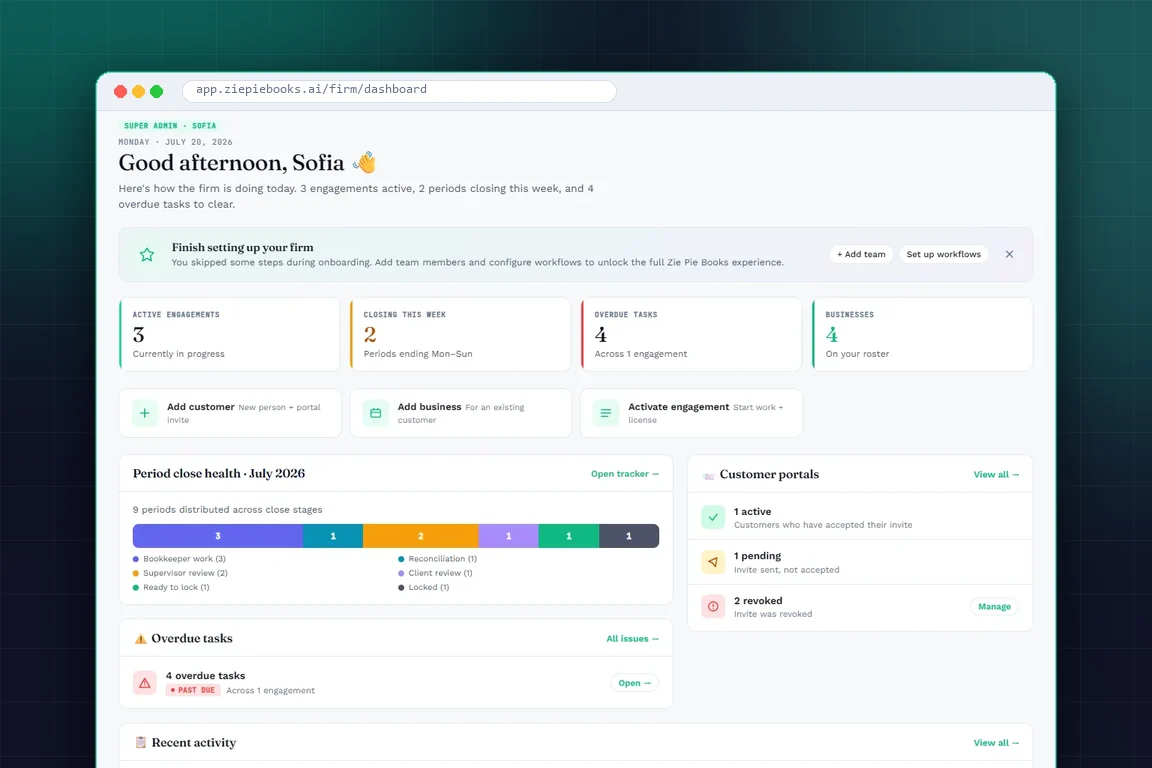
AI bookkeeping platforms built for firms bring all client work into one place, one workflow, and one dashboard. ZiePieBooks, for example, runs each client engagement through a set workflow. It goes from intake and document collection all the way through categorization, review, reconciliation, and client sign-off. The next step only opens when the previous one is done. The result is consistent quality across every client, not just the ones with careful bookkeepers.
The Future of AI-Driven Bookkeeping
AI bookkeeping automation is still growing, but several trends are already happening. Real-time reconciliation is becoming the norm. Predictive anomaly detection is getting better. Automated month-end close processes are cutting down the manual coordination that usually adds days to every closing cycle.
The accountant's role is shifting from entering data to providing financial insight. That means reviewing AI outputs, spotting patterns, and advising clients on what the numbers mean. That shift is good for everyone. Firms get more value from their teams. Clients get more helpful financial conversations. And bookkeepers spend their time on work that actually needs a human.
One thing to know: ZiePieBooks uses AI, but humans stay in control at every single step. AI handles the repetitive tasks, and your team reviews, approves, and decides before anything is finalized. Smart automation and human judgment work together.
That is why ZiePieBooks is built this way: AI catches errors and processes data fast, but people make the final call. Keeping humans in the loop means fewer mistakes and full confidence in every number that gets approved.
Frequently Asked Questions
What is AI-driven bookkeeping?
+
AI-driven bookkeeping uses smart technology and automation to handle repetitive bookkeeping tasks like data entry, transaction categorization, bank reconciliation, and invoice processing. Unlike traditional accounting software, AI bookkeeping learns from past data and gets more accurate over time.
Can AI completely replace manual bookkeeping?
+
No. AI automates the repetitive, high-volume tasks in bookkeeping but cannot replace human judgment for complex accounting decisions, tax strategy, compliance, and financial advice. The best bookkeeping workflows combine AI automation with human review.
Is AI bookkeeping accurate?
+
AI bookkeeping accuracy depends on data quality and system design. Well-built AI systems, especially those that check a firm's own approved transaction history before applying AI categorization, can reach high accuracy. Exceptions are clearly flagged for human review, and accuracy keeps improving as the system learns.
What bookkeeping tasks can AI automate?
+
AI can automate data extraction from bank feeds and financial documents, transaction categorization, bank and credit card reconciliation, duplicate detection, invoice processing, anomaly flagging, and routine financial reporting.
Is AI bookkeeping suitable for small businesses?
+
Yes! AI bookkeeping cuts down on manual admin work no matter the size of the business. For small businesses, it reduces hours spent on data entry and reconciliation. For accounting firms managing small business clients, it lets them handle more clients without adding more manual work.
How do I move from manual bookkeeping to AI automation?
+
Start by looking at your current workflow and finding the tasks that take the most time. Clean up and organize your existing financial data, then connect your bank accounts and accounting platforms to an AI bookkeeping system. Set up your categorization rules, create an exception-based review process, and watch how accuracy improves as the system learns your patterns.
Turn Manual Bookkeeping Into an Intelligent Workflow
The manual bookkeeping workflow does not have to be slow or disconnected. AI connects every step into one smooth process. It captures data, sorts transactions, reconciles accounts, flags exceptions, and generates up-to-date reports.
With ZiePieBooks, AI works inside a controlled environment. It handles the repetitive tasks, but a real person reviews and approves every key decision. The final call is always human, not AI. That keeps errors low and gives your team full confidence in the numbers!
That shift does not eliminate the need for accounting expertise. It refocuses it. Bookkeepers and accountants spend less time on admin processing and more time on analysis, advice, and the judgment calls that truly need a human.
If your firm is ready to move from scattered client logins and manual workflows to a system where AI does the heavy lifting and your team stays in control, ZiePieBooks is a great place to start. Start a 30-day free trial and bring your client businesses under one roof, one workflow, and one clear dashboard with no credit card required!