A new catch-up client hands over eighteen months of bank statements as PDFs. Some are downloads, some are scans, one is a photo of a printout. Before any real bookkeeping can happen, someone has to get every transaction off those pages and into the books.
For many firms, that someone types them in. It takes days, it introduces errors, and it is the step where months get skipped or entered twice. This post looks at why statement entry is still manual at so many firms and how ZiePieBooks turns it into an upload and a review.
Key Takeaways:
- Manual statement entry is slow, and every keyed line is a chance for a transposed digit or a skipped row.
- The bigger risk is structural: duplicate statements and missing months, which silently distort the books.
- Bank feeds should be the default. Uploads are for accounts that cannot feed and for history before the feed started.
- ZiePieBooks reads PDFs and CSVs, even a full year in one file, and drops the transactions into one staging queue for review.
- Duplicate statements for a period already covered are refused on the way in.
Why Statement Entry Is Still Manual
Bank feeds solved the problem going forward, but only going forward. Feeds typically start from the day they connect, and some accounts never connect cleanly. That leaves three common gaps:
- Catch-up history. Months or years before the feed started.
- Accounts without a reliable feed. Smaller banks, some credit cards, payment processor exports.
- Feed gaps. Weeks lost when a bank's consent expired and nobody noticed.
Every gap gets filled from a statement. And because CSV exports differ by bank and PDFs are, well, PDFs, many firms fall back to typing.
The errors you do not see
Typos are the obvious risk, but reconciliation usually catches those. The quieter risks are structural. Two people each upload March. Someone skips October because it arrived late. A CSV export overlaps the feed by two weeks. None of these show up as a typo. They show up as revenue that is slightly too high, or a balance that will not tie out at year-end.
How ZiePieBooks Solves It
In ZiePieBooks, every source of transactions ends up in the same place: staging. Feeds, CSVs and PDFs all land in one review queue before anything touches the ledger.
CSV: a wizard that figures out the layout
Every bank exports CSV differently. Column order, date formats and debit and credit conventions all vary. In ZiePieBooks, a CSV goes through a four-step wizard that detects the layout and maps the columns. You confirm the mapping, review the periods and transactions it found, and process the file.
PDF: extraction, summary first
A PDF statement is read by the extraction engine. It reads the summary first, including the opening and closing balances, then the pages you choose. The balances are kept to seed the bank reconciliation. The extracted rows arrive in staging with confidence scores, so anything the engine was unsure about is easy to find.
Even a full year in one file
Catch-up clients often have an annual export rather than twelve monthly files. You can upload a full year in one file. The platform reads it and drops the transactions straight into staging for review, so you do not need to split it first.
Duplicates refused at the door
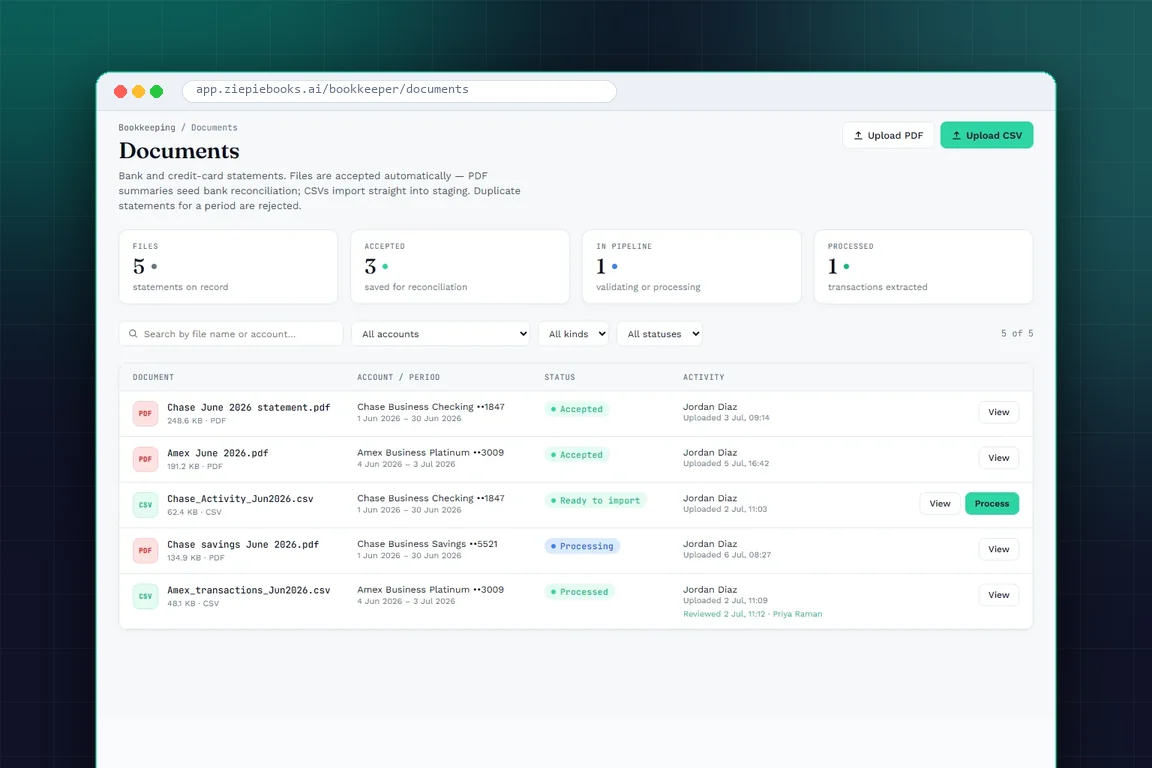
Every document is tied to an account and a period. When someone uploads a statement for a period that is already on record, it is refused. That single check prevents the most common way books get double-counted.
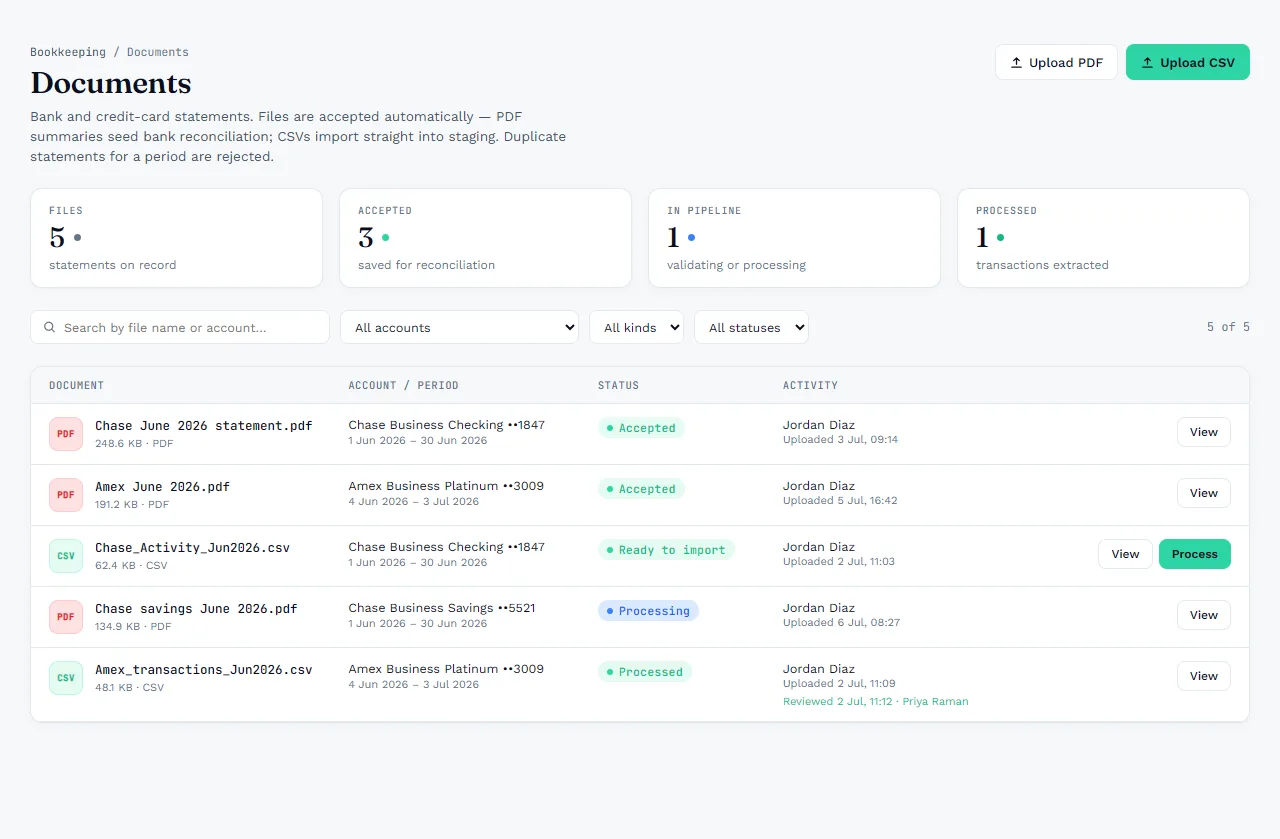
The Documents screen also answers the questions that usually need an email. Which statements do we have? Which period does each cover? Has it been processed? Who uploaded it, and who reviewed it? Clients can upload from their own portal too, so statements arrive straight into the pipeline instead of as attachments.
A Practical Order for Catch-Up Work
- Connect feeds first. Get every account that can feed connected, so new transactions stop adding to the backlog.
- List the gaps. For each account, note the months the feed does not cover.
- Prefer CSV over PDF when the bank offers it. It is structured data. Use PDF for everything else.
- Upload by account and period. Let the system catch duplicates rather than relying on memory.
- Review in staging, then reconcile. The PDF's balances seed the reconciliation, which proves nothing was missed.
Stop retyping statements
Upload your next catch-up client's statements into ZiePieBooks. Start with a 30-day free trial, with PDF and CSV import included. Create your free account.
Frequently Asked Questions
Can ZiePieBooks read PDF bank statements?
+
Yes. A PDF statement is read by the extraction engine, summary first, then the pages you choose. Its balances are kept to seed the bank reconciliation, and extracted transactions go to staging for review.
How does ZiePieBooks handle CSV files from different banks?
+
A CSV goes through a four-step wizard that detects the layout and maps the columns, so differently formatted exports from different banks all land in the same staging queue.
What stops the same statement from being imported twice?
+
ZiePieBooks checks each upload against the account and period it covers. A duplicate statement for a period already on record is refused instead of being imported again.