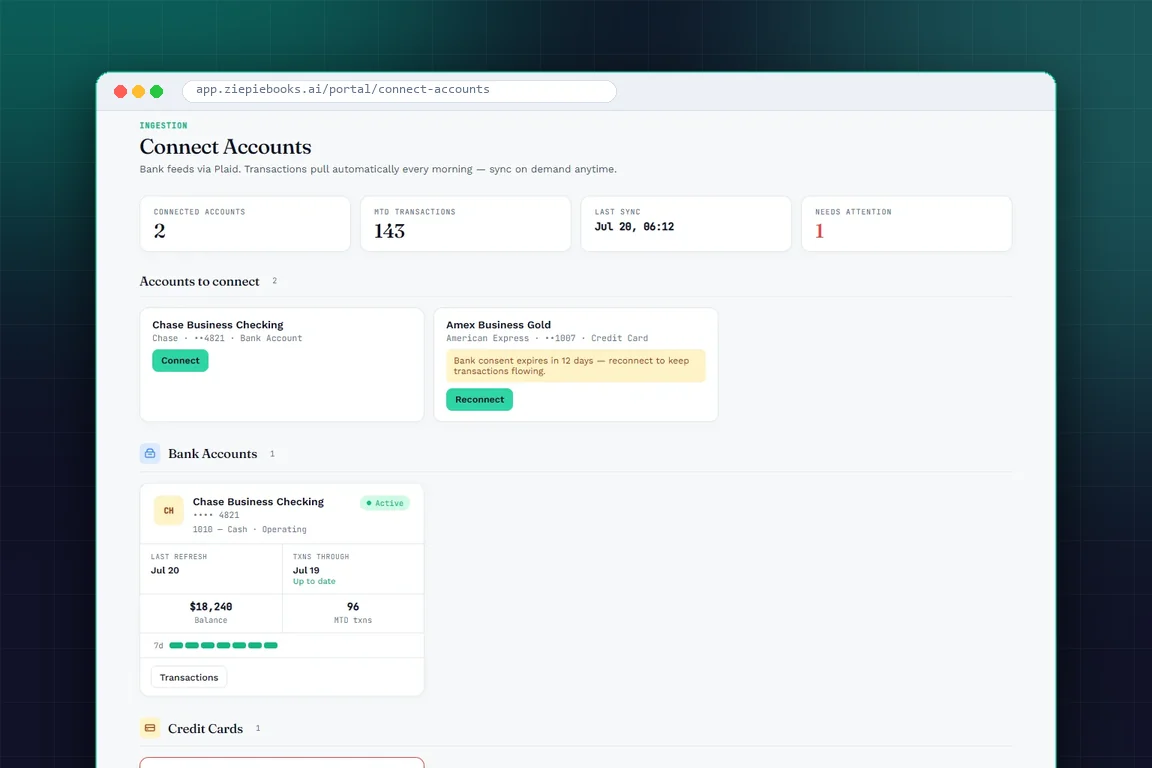
You won the client. Now the real work starts: send the engagement letter, ask which banks they use, ask again, request twelve months of statements, receive seven of them as phone photos, and chase the rest. A week later you are ready to begin the books you were hired to do.
Client onboarding is where many firms quietly lose margin. It is unbilled, it is mostly email, and every missing piece blocks the work behind it. This post breaks down why onboarding drags and how ZiePieBooks turns it into a single link the client completes on their own.
Key Takeaways:
- Onboarding stalls because the steps are scattered across email threads with no single place that shows what is still missing.
- The client should do the data entry: their businesses, their accounts, and how each account's statements will arrive.
- Bank credentials should never pass through the firm. Clients connect their own accounts through Plaid.
- Scope and price belong in a proposal the client reads, questions and signs in the same place, not in a PDF attachment.
- In ZiePieBooks, every onboarding step is recorded, so nothing is handled offline and nothing gets lost.
Why Onboarding Turns Into a Week of Email
Onboarding is not hard work. It is fragmented work. A firm needs maybe six things from a new client, but each one tends to live in its own thread:
- A signed engagement letter, sent as a PDF and returned (eventually) as a scan.
- A list of businesses, if the client has more than one.
- A list of bank and card accounts, which is almost always incomplete the first time.
- Access to those accounts, which too often means a shared password.
- Historical statements, arriving in batches and formats you did not ask for.
- Agreement on scope and price, buried somewhere in the conversation.
Because no single place shows which of those six are done, someone at the firm has to keep the checklist in their head. When that person is busy, onboarding waits. When they are out, it stops.
The shared-password problem
The most uncomfortable part of traditional onboarding is bank access. Clients send their online banking login so the firm can download statements. Now the firm holds a credential it never should have had, in an email inbox, with no record of who used it. It is a security risk for the client and a liability for the firm.
What Good Onboarding Looks Like
Good onboarding has three properties:
- One entry point. The client gets one link and everything happens behind it.
- The client does their own data entry. They know their businesses and accounts better than you do. Let them type it once, in a structured form.
- Everything is recorded. Verification, intake, approvals and acceptance are all on the record, so the firm never has to reconstruct what was agreed.
How ZiePieBooks Solves It: One Link, All Recorded
In ZiePieBooks, a new client gets one onboarding link. Behind it is their own secure portal, under your firm's roof. Here is how the steps flow.
1. Verify, then fill in the intake form
The client verifies their email and fills in the intake form for each business. That includes every bank account and how its statements will arrive, whether by feed or upload. They submit it, and your firm reviews and approves it. No list typed into an email, and no follow-up asking which card they forgot.
2. Set up the engagement in one guided flow
On the firm side, the engagement wizard walks through intake, accounts and team, workflow, tasks, license and review in order. When you activate the engagement, every period and every task is generated at once.
3. Agree scope and price in a proposal, not an attachment
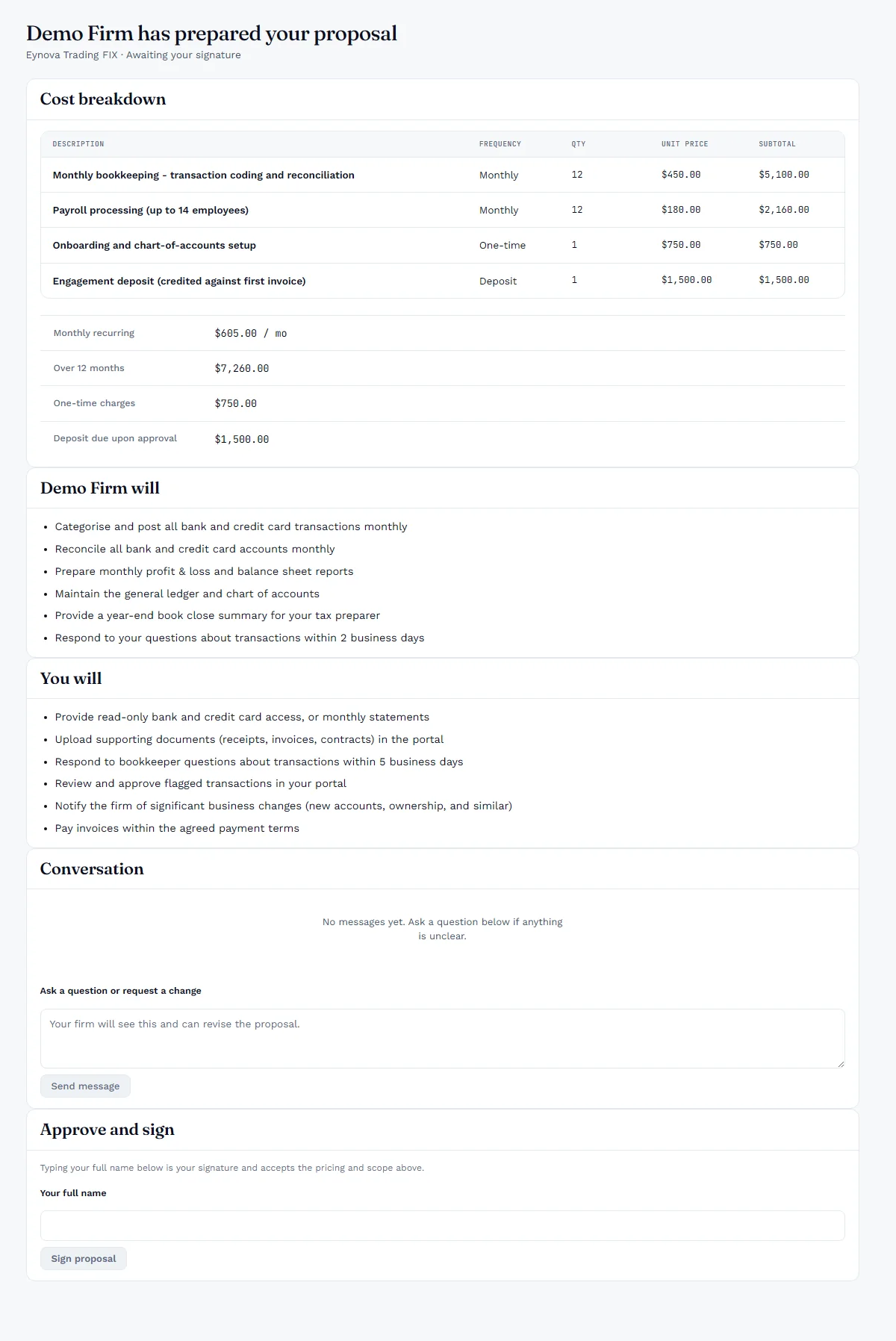
Your firm prices the engagement in a proposal. The client reads it, asks questions and signs it in the same portal. The cost breakdown shows monthly, one-time and deposit lines, and scope is spelled out for both sides. The conversation sits with the proposal instead of in a separate thread.
4. The client connects their own banks
This is where the shared-password problem disappears. The client connects each account through Plaid from their own portal. Bank credentials never pass through your firm.
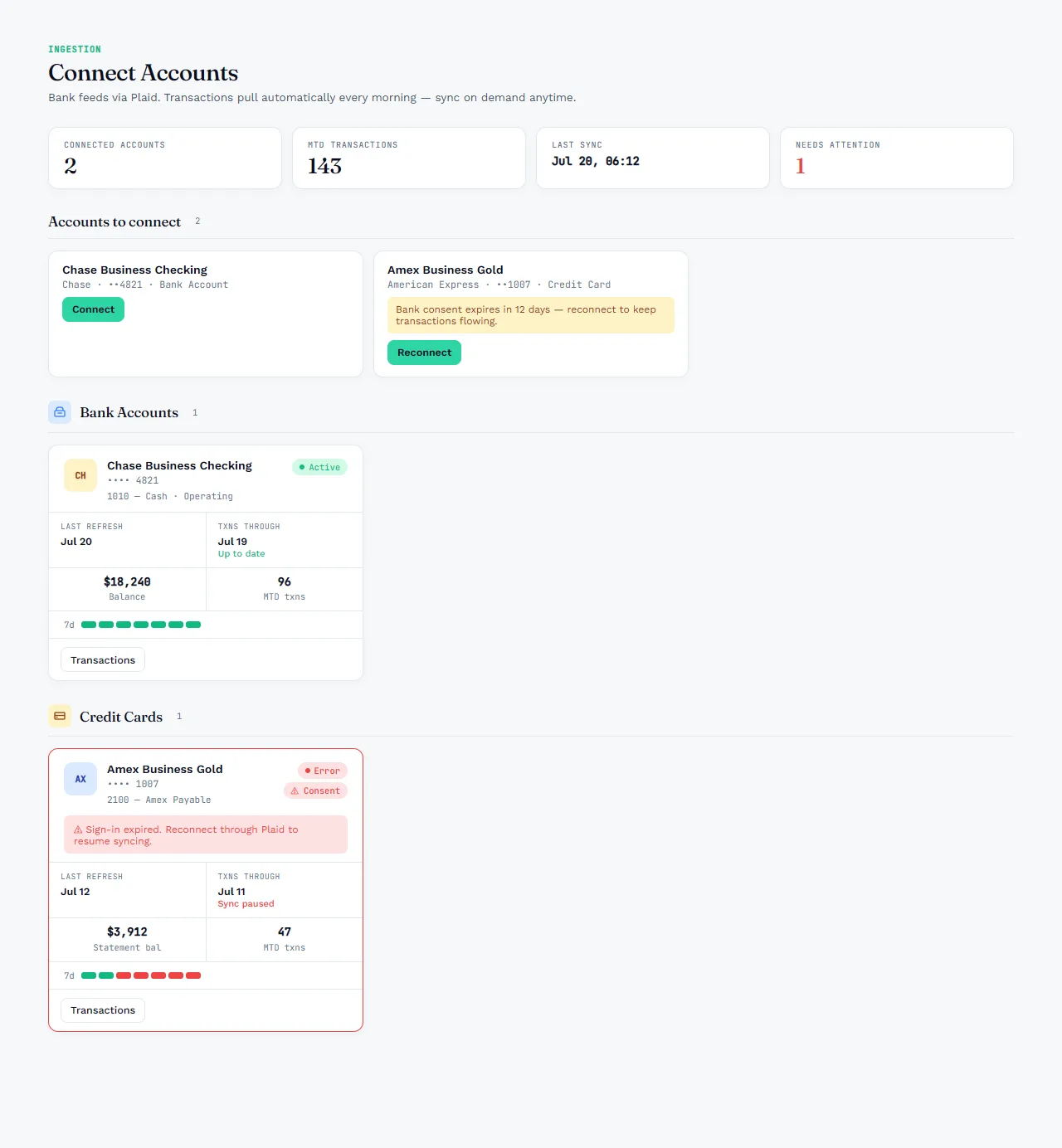
Notice what this screen does after onboarding, too. It shows when each account last synced, whether transactions are up to date, and when a bank's consent is about to run out. When a card's sign-in expires, the client sees the warning and reconnects it themselves. Your bookkeeper sees the same status from the firm side, so nobody discovers a three-week gap in the feed at month-end.
5. Statements that cannot feed are uploaded
Some accounts will never connect cleanly. For those, the client uploads the statement in their portal. A PDF is kept and read for its balances. A CSV is imported into staging. A duplicate statement for a period already covered is refused, so you never import the same month twice.
An Onboarding Checklist You Can Use Today
- Send one link, not six emails. Everything the client needs to do should sit behind it.
- Make the client list every account up front. Ask how each one's statements will arrive while you have their attention.
- Never accept a banking password. Use a feed the client connects themselves, or a statement upload.
- Put the price in a proposal the client signs. Keep questions about it attached to it.
- Activate the engagement only when intake is approved. Then generate the whole job so you can staff it on day one.
Onboard your next client with one link
Try ZiePieBooks free for 30 days, with every feature included and no credit card required. Create your free account and send your first onboarding link today.
Frequently Asked Questions
What information do I need to onboard a new bookkeeping client?
+
You need the client's verified contact details, each business they want you to keep books for, every bank and card account for those businesses, how statements will arrive for each account, and their acceptance of the engagement scope and price.
Does my firm ever see the client's bank login?
+
Not in ZiePieBooks. The client connects each account through Plaid from their own portal, so bank credentials never pass through your firm. Your bookkeeper sees the connection status and the transactions, not the password.
What if a client's bank cannot connect through a feed?
+
The client uploads the statement instead. A PDF is kept and read for its balances, a CSV is imported into staging, and a duplicate for a period already covered is refused.