The accounting firm of the future
AI bookkeeping software for accounting firms
Faster closes. Cleaner books. Happier clients.
ZiePieBooks is AI-native firm management and bookkeeping in one system. Your whole practice and every client's books, under one roof you own.
The problem
Your firm shouldn't live inside your clients' logins
Right now your firm's work is scattered across dozens of QuickBooks and Xero accounts you don't own and can't control. Every client is a separate login. Every bookkeeper does things a little differently. Reviews get skipped because nothing makes them happen. And when someone asks the question that really matters, where does my firm stand, across every client, today?, nobody can give a straight answer.
Logins you don't control
Your work product lives inside subscriptions the client owns and can cut off.No two bookkeepers work the same
Your process lives in humans' heads, not your firm.Reviews get skipped
Nothing forces a second set of eyes before a period closes.Charts of accounts drift
Each client's books drift apart, and quality erodes.No firm-wide picture
You learn a client is behind when they complain, not before.The problem was never any one client's books. It's that your firm's work lives everywhere except under your own roof.
What ZiePieBooks does
Firm management and bookkeeping in one system
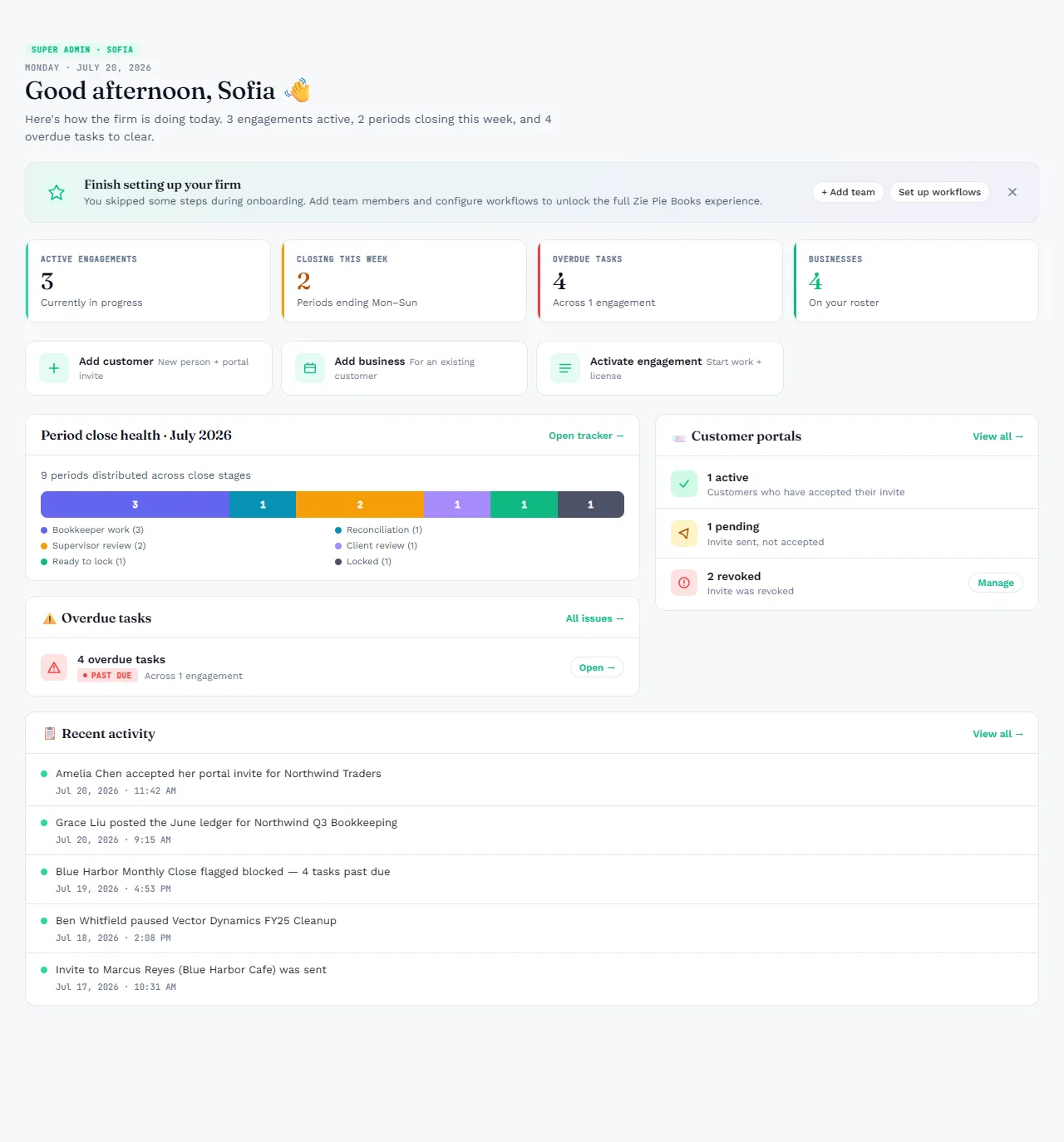
Bring every client's books under your firm's control. Run them through one workflow you define. Get a single live view of the whole practice, so the work, the review, and the books are finally the same record.
Own your firm's work
Your clients' books live under your firm's roof, not inside a login the client controls. One source of truth, fully isolated from every other firm.
Run the full engagement lifecycle
From intake to signed-off close, every client runs on a workflow you set once. Onboarding, document collection, categorization, review, reconciliation, period close, and client sign-off all happen in one connected flow. The next step unlocks only when the last one is done.
Know your team
See who's doing what, where work is stuck, and how capacity is holding up. Everyone gets a personal queue, and you get the firm-wide view. Built-in time tracking shows how long the work really takes, and which engagements are actually worth it.
See what's really happening
Real numbers on cost, time-to-close, and how much the AI is carrying versus your team. Where the firm stands fits on one screen, instead of taking an afternoon of digging.
Migrate from QuickBooks or Xero without the headache
Bring clients over from QuickBooks or Xero on a supported migration path, with clean opening balances. Onboard at your own pace.
Built for firms managing any number of clients, and free for any firm to start today.
Why ZiePieBooks
Why accounting firms choose ZiePieBooks
When your work is spread across client logins, spreadsheets, and email, things slip. Here's what changes when it all lives under one roof.
Know where the firm stands
One live dashboard shows every client, engagement, and period, current to the second.Own your firm's work
Your clients' books move under your firm's roof, not inside a login the client controls.Stop coding transactions by hand
Your firm's own approved history matches known vendors instantly; AI handles only the unknowns, with a confidence score.No more skipped reviews
Every transaction passes through a recorded approval chain before a period can close.Prove who did what
Every change is permanent, cryptographically chained, and verified nightly.Bring clients into the process
They review and sign off on their own books securely online, not over email.How we're different
One system instead of five
QuickBooks and Xero keep the books. Canopy and Karbon run the practice. Digits adds AI. Most firms stitch them together and re-key the gaps by hand. ZiePieBooks is built as the whole stack in one record.
The usual firm stack
- LedgerQuickBooks or Xero, one login per client
- Practice managementCanopy or Karbon, with no books inside
- AI bookkeepingDigits or another add-on
- Client portal & documentsEmail threads and shared drives
- Close trackingA spreadsheet someone keeps updated
5+ tools · dozens of logins · work re-keyed between them
ZiePieBooks
- LedgerEvery client's books, under your firm's roof
- Practice managementWorkflows, queues and capacity, on the same books
- AI bookkeepingYour firm's history first, AI for the unknowns
- Client portal & documentsRequests, uploads and sign-off, built in
- Close trackingLive, because the close is the workflow
1 system · 1 login · one record from intake to sign-off
| Capability | ZiePieBooks | QuickBooks Onlinewith QuickBooks Online Accountant | Xerowith Xero HQ / Practice Manager | Digits | Canopy | Karbon |
|---|---|---|---|---|---|---|
| Firm management | ||||||
| Every client's books in one system the firm controls | Built inOne login, isolated from every other firm | PartialClient list; each company is its own file | PartialXero HQ; each organisation is separate | PartialOne account per business | Not includedBooks live in another tool | Not includedBooks live in another tool |
| Engagements: proposal, client acceptance, intake, activation | Built inScope, line items, amendments, pause and close | Not included | PartialQuotes and jobs in Practice Manager | Not included | PartialEngagement letters and e-signature | PartialProposals and engagement letters |
| Workflow templates with stages, tasks and dependencies | Built inDefine once, every engagement runs on it | PartialProjects and tasks in the Work tab | PartialJobs and tasks in Practice Manager | Not included | Built in | Built in |
| Tasks tied to the ledger: a period can't close until its tasks are done | Built inReview is a gate, not a reminder | Not included | Not included | Not included | PartialTasks track the work, not the books | PartialTasks track the work, not the books |
| Personal work queue for every team member | Built inMy Work, with what needs you first | Partial | Partial | Not included | Built in | Built in |
| Team workload: who holds what, overdue and blocked, reassign in bulk | Built inTeam Work, filtered by person and engagement | Partial | PartialPractice Manager | Not included | Built in | Built in |
| Roles and permissions, with per-person overrides | Built inYour own roles, per feature | PartialFixed access levels | PartialFixed user roles | Partial | Built in | Built in |
| Live firm-wide dashboard across every client's close | Built inRead from the books, not a status field | PartialClient list overview | PartialClient list overview | Partial | PartialWork status, not the books | PartialWork status, not the books |
| Client portal: documents, requests and review | Built inIntake, uploads, bank connections, review | PartialDocument requests from the accountant tools | PartialQueries from Xero HQ | PartialClient app | Built in | Built in |
| Client sign-off recorded against the period's books | Built inAcknowledgement stored with the period | Not included | Not included | Not included | PartialE-signature on documents | PartialE-signature on documents |
| Immutable, hash-chained audit log, verified nightly | Built in | PartialAudit log | PartialHistory and notes | Not published | PartialActivity history | PartialActivity timeline |
| Bookkeeping | ||||||
| General ledger, journal and chart of accounts | Built inFirm-wide COA templates enforced per client | Built in | Built in | Built in | Not included | Not included |
| Bank and card feeds | Built inClient connects from their portal | Built in | Built in | Built in | Not included | Not included |
| PDF bank statement extraction, including a full year in one file | Built inRead, reconciled to the statement, staged | PartialCSV import; receipts via capture | PartialCSV import; add-ons for PDFs | Partial | Not included | Not included |
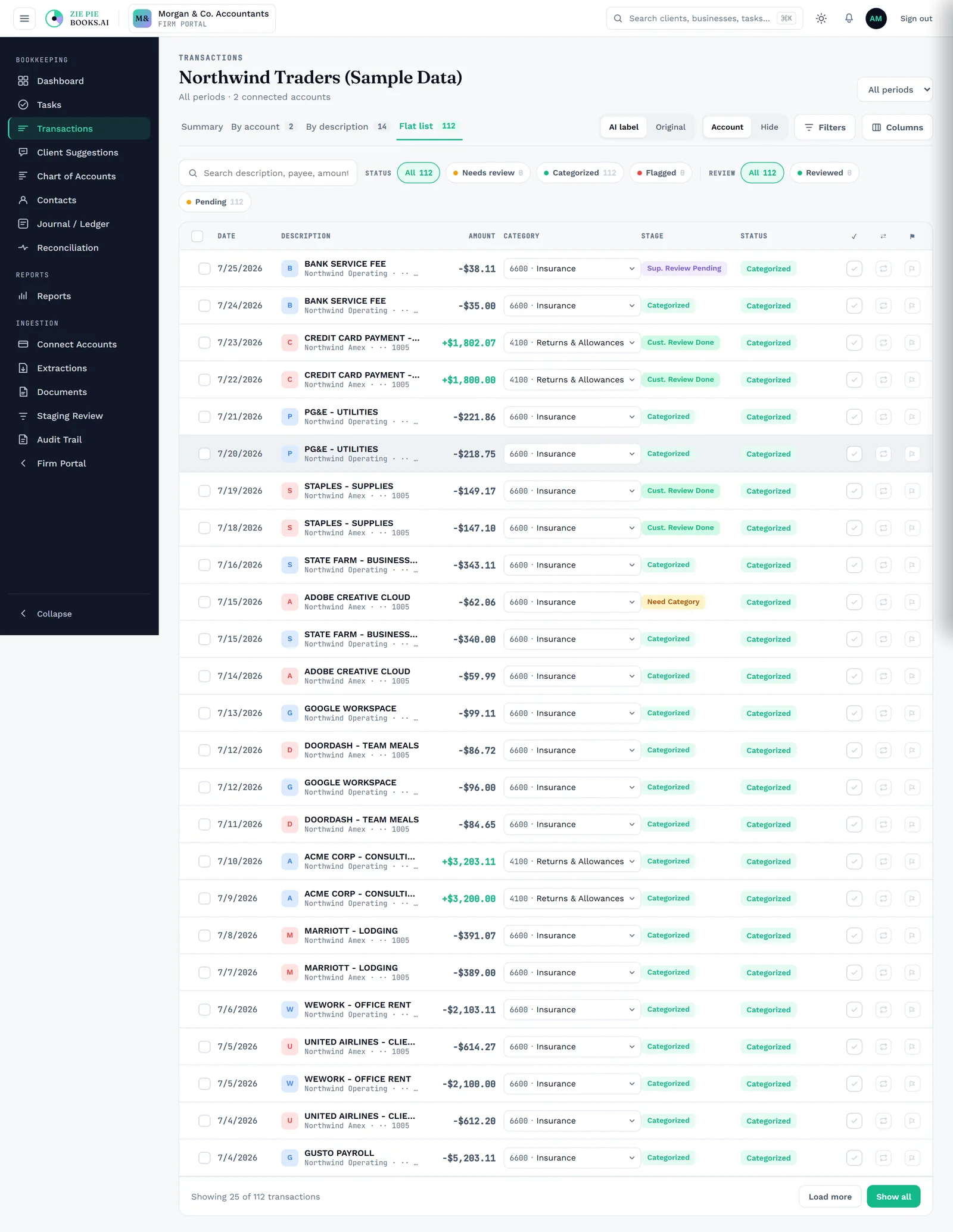
| History-first categorization from the firm's own approved mappings | Built inKnown vendors match instantly, across clients | PartialBank rules per company | PartialBank rules per organisation | Partial | Not included | Not included |
| AI categorization with a confidence score on each suggestion | Built inOnly for what history can't answer | PartialSuggestions, no score shown | PartialSuggestions, no score shown | Built in | Not included | Not included |
| Staging review before anything posts to the ledger | Built inBookkeeper, supervisor and customer queues | Partial"For review" list | PartialReconcile screen | Partial | Not included | Not included |
| Mandatory supervisor approval before a transaction counts toward the close | Built inRecorded approval chain | Not included | Not included | Not included | Not included | Not included |
| Bank reconciliation with statement comparison and reopen history | Built in | Built in | Built in | Built in | Not included | Not included |
| Period lock, with every reopen logged | Built inReopen is a permission and an audit event | PartialClosing date and password | PartialLock dates | Partial | Not included | Not included |
| Reports: P&L, balance sheet, cash flow, trial balance, what changed | Built inPlus review signals and an owner report | Built in | Built in | Built in | Not included | Not included |
Based on each product's publicly available core offering as of October 2026; add-ons and integrations can change the picture, so check each vendor before deciding. QuickBooks, Xero, Digits, Canopy and Karbon are trademarks of their respective owners.
Nothing gets re-keyed
The task, the transaction and the client's approval are the same record, so nothing is copied between a practice tool and a ledger and drifts out of sync.
Review isn't optional
Because the workflow and the books share one system, a period can't close until its review is recorded. A separate task list can only remind you.
One answer, one screen
Where every client stands is a live view of the books themselves, not a spreadsheet stitched together from five logins at month end.
The return
Close your clients' books in days, not weeks.
The close isn't slow because your people are slow. It's slow because the work is scattered across logins, inboxes, and someone's memory. Here it runs on one system, and the firm runs with it.
Import bank statements
Connect a bank, or drop a PDF or CSV, even a full year in one file. It's read for you and staged for review.
Categorize transactions
Your firm's own approved history matches known vendors instantly. AI takes only what's left, each with a confidence score.
Route work through review and sign-off
The workflow you defined once assigns the work and moves it: bookkeeping, review, sign-off. The next period opens on schedule. Nobody chases anybody.
Reconcile and lock the period
Match the statement, validate the cleared balance, lock the period. Permanent, and provable years later.
Every close, on one screen. You see which clients are done, which are behind, and where the work is stuck, before the client asks.
AI with a human in charge
AI bookkeeping with a human in control
We use AI where it actually earns its keep: reading statements, categorizing transactions, and flagging what needs attention. It checks your firm's own approved history first, so a vendor you've coded before gets matched instantly. AI only steps in for the unknowns, and each one comes back with a confidence score so your team reviews what really matters.
The decisions that define your firm stay with your people. You decide how the workflow runs, what the chart of accounts is allowed to be, which reviews are mandatory, and when a client signs off. Every change is recorded as permanent, cryptographically chained history and verified automatically every night, so you can always prove who did what, and when.
Leverage you can still stand behind.
Start your firm on ZiePieBooks free
Create your free account in 30 seconds. Enter your email, verify it, and you're in. Built for firms who feel the login-sprawl problem most.